Say what should change. Done.
No site builder, no manual: you say or write what should change in your ordering portal – or send a screenshot. The AI assistant suggests the right settings, you preview the result and apply it with one click.
- No commission
- Dedicated instance per brand
- Hosted in Germany
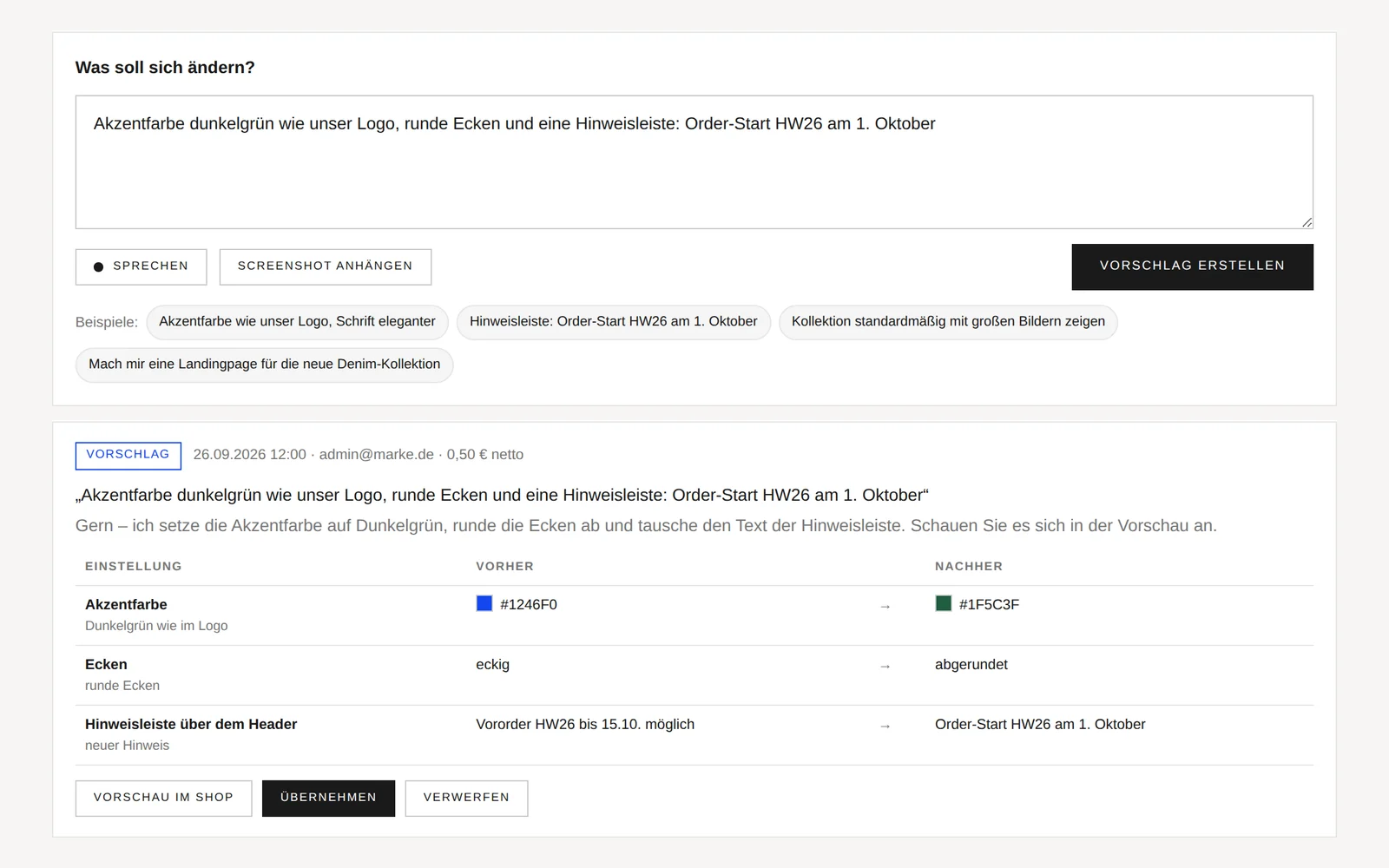
Speak instead of click
One sentence is enough: “Accent colour like our logo, rounded corners and a notice bar for the order launch.” The assistant understands spoken language, text and screenshots – such as an image of a page whose style you would like to adopt.
- Voice input directly in the browser (Chrome, Edge, Safari)
- Attach or paste a screenshot
- Suggestion with before and after
Preview first, then apply
Every suggestion can be previewed in the shop before it takes effect – only for you, retailers and sales agents notice nothing. Applying takes one click, and so does reverting. Every job remains traceable in the history.
- Preview in the shop for the admin only
- Revert in one click
- History with date, person and price
New pages as drafts
If you would like a landing page, a collection page or an info page, the assistant builds it as a draft using the content assistant – you review it, swap images and publish.
- Landing and collection pages
- Built from Pagebuilder components
- Published only after your approval
Built securely
The assistant only changes approved settings – design, brand, notices, catalogue, order and checkout options. It does not touch program code, products, customers or prices. Larger requests are recorded as feature requests and passed on to us.
- No changes to program code
- Updates to your instance stay secure
- Feature requests go to STYLEPOT
See it with your own collection.
30-minute live demo, no obligation – ideally with your products.
AI assistant: answers
What can the AI assistant change?
Colours, font, corners, icons, dark mode, logo size, brand name and tagline, the notice bar, the default collection view, stock and RRP display, order and checkout options, seasons and the e-mail footer. New pages are built as drafts.
Can the assistant break anything?
No. It only changes approved settings, never program code or data. You see every change in the preview beforehand and can revert it later with one click.
How much does the AI assistant cost?
Billing is based on actual usage – small changes cost little, a whole page correspondingly more. You can see the price of every job in the history and in the “AI & Billing” overview.
Which browsers support voice input?
Voice input uses the browser's speech recognition, for example in Chrome, Edge and Safari. In other browsers you simply type your instruction as text.
See your collection in STYLEPOT.
30-minute live demo – ideally with your own products. We will get back to you within one working day, usually the same day.
- Free and without obligation
- Personal, with a dedicated contact person
- Then a fixed quote – setup and ERP integration based on your scope
- DEHosted in Germany
- §GDPR-compliant, DPA
- RODeveloped in Rosenheim
E-Commerce Innovations GmbH · Hofmillerstr. 9 · 83024 Rosenheim